
Analog Filter Design and Implementation in MATLAB
Advertisement
This document provides MATLAB code examples for designing and simulating analog low-pass and high-pass filters. Let’s dive into the implementations.
Analog Low Pass Filter MATLAB Code
clc;
close all;
clear all;
f=100:20:8000;
fh=900;
k=length(f);

for i=1:k
  m(i)=1/sqrt(1+(f(i)/fh)^2);
  mag(i)=20*log10(m(i));
end

figure;
semilogx(f,mag);
title('Magnitude Response of Analog Low Pass Filter')
xlabel('Frequency----->');
ylabel('Magnitude in dB');
grid on;
This code calculates and plots the magnitude response of an analog low-pass filter. Here’s a breakdown:
clc; close all; clear all;: Clears the command window, closes all figures, and clears all variables from the workspace. This is standard practice to ensure a clean environment.f=100:20:8000;: Defines a frequency vectorfranging from 100 Hz to 8000 Hz with a step of 20 Hz. This is the range over which the frequency response will be plotted.fh=900;: Sets the cutoff frequencyfhto 900 Hz. This is a key parameter determining the filter’s behavior.k=length(f);: Determines the length of the frequency vectorfand stores it ink.- The
forloop calculates the magnitude response:m(i)=1/sqrt(1+(f(i)/fh)^2);: This is the transfer function of a first-order low-pass filter. It calculates the magnitudem(i)at each frequencyf(i).mag(i)=20*log10(m(i));: Converts the magnitudem(i)to decibels (dB).
- The
figure; semilogx(f,mag);commands create a new figure and plot the magnitude response in dB against frequency (on a logarithmic scale for the frequency axis). - The remaining commands add a title, axis labels, and a grid to the plot for better readability.
Here’s the expected output plot:
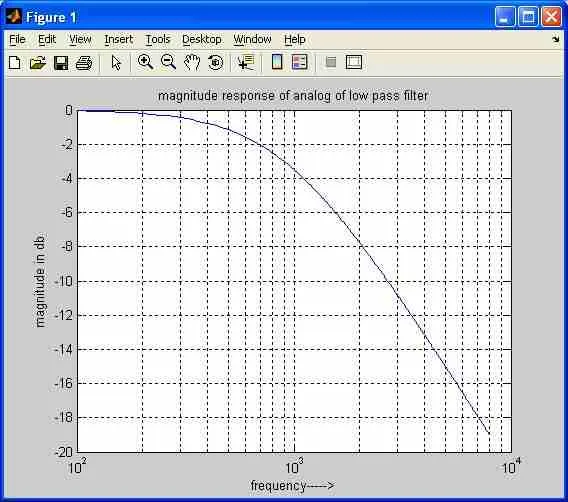
The plot shows the typical frequency response of a low-pass filter, where frequencies below the cutoff frequency are passed with little attenuation, while frequencies above the cutoff frequency are increasingly attenuated.
Analog High Pass Filter MATLAB Code
clc;
close all;
clear all;
f=100:20:8000;
fl=400;
k=length(f);

for i=1:k
  m(i)=1/sqrt(1+(fl/f(i))^2);
  mag(i)=20*log10(m(i));
end

figure;
semilogx(f,mag);
title('Magnitude Response of Analog High Pass Filter');
xlabel('Frequency----->');
ylabel('Magnitude in dB');
grid on;
This code is very similar to the low-pass filter code, but it implements a high-pass filter. Here’s a breakdown of the key differences:
fl=400;: Sets the cutoff frequencyflto 400 Hz.m(i)=1/sqrt(1+(fl/f(i))^2);: This is the transfer function of a first-order high-pass filter. Notice thatflis now in the numerator of the fraction inside the square root, which is the crucial difference that makes it a high-pass filter.
Here’s the expected output plot:
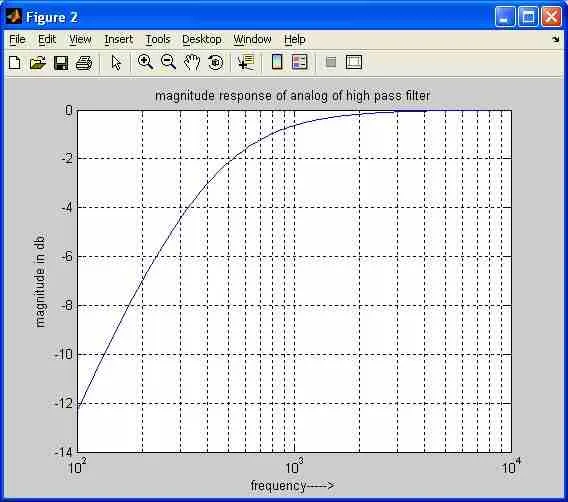
The plot shows the typical frequency response of a high-pass filter, where frequencies above the cutoff frequency are passed with little attenuation, while frequencies below the cutoff frequency are increasingly attenuated.
Continue Learning Filter Fundamentals & Terminology
- Lumped Element Filter : Key Advantages & Disadvantages
- Microstrip Based RF Low Pass Filter Design Example
- Understanding Filter Terms
- RF Filters : Types, Selection Guide, Advantages & Disadvantages
- Active vs Passive Filters
- Analog vs Digital Filters
- Butterworth, Chebyshev, Bessel, and Elliptic Filters
- FIR Filter vs IIR Filter
- Understanding CIC (Cascaded Integrator-Comb) Filters
- Pi Filter: Advantages & Disadvantages
- Active vs Passive Harmonic Filters
Explore More RF, Microwave & High Frequency Filters
- SAW vs BAW Filters
- FBAR Filters: Advantages and Disadvantages
- Cavity Filter Types: Advantages & Disadvantages
- Microstrip Filter Structures: Basics and Types
- LTCC Filter Types
- MMIC RF Reflectionless Filter
- Suspended Substrate Stripline Filter
Explore MATLAB Signal Processing & Filtering
- Analog Filter Implementation in MATLAB
- FIR Digital Filter (MATLAB Source Code)
- Low Pass FIR Filter Implementation in MATLAB
- FIR Digital Filter Design: Kaiser Window in MATLAB
- FIR Digital Filter: Rectangular Window in MATLAB
- FIR Digital Filter: Triangular Window in MATLAB
- Low Pass IIR Butterworth Digital Filter (MATLAB Code)
- Butterworth Filter Design in MATLAB
- Convolution (MATLAB Source Code)
- Auto/Cross-Correlation in MATLAB
- 16-point FFT/DFT MATLAB Code using Decimation in Frequency
- IFFT MATLAB: Inverse Fast Fourier Transform
- Decimation/Downsampling (MATLAB Source Code)
- MATLAB Code for Interpolation and Up-Sampling
- Plotting 2D/3D Curves in MATLAB