
SATA vs IDE (PATA): A Comprehensive Comparison
By RF Wireless Expert Team
Advertisement
This article compares SATA and IDE (also known as PATA) hard drive technologies, helping you choose the right drive for your needs based on various factors.
SATA (Serial Advanced Technology Attachment)
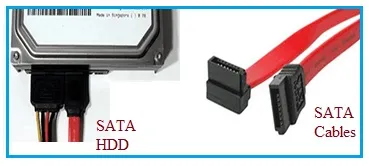 SATA HDD and Cables
Here’s a breakdown of SATA features:
- Definition: SATA stands for Serial Advanced Technology Attachment. The “AT” refers to IBM’s PC/AT standard. Introduced in 2003.
- Speed: SATA is a newer standard that supports higher speeds compared to IDE/PATA drives. This is why SATA has largely replaced IDE devices in modern systems.
- Storage Capacity: Typically offers large storage capacities.
- Hot Plugging: Supports hot plugging, meaning you can connect or disconnect the drive while the system is running (with proper configuration).
- Data Transfer Rates: SATA data transfer rates can reach up to 6 Gbps.
- Cables: SATA cables are narrow, about a meter long, and are often split into separate power and data connectors.
- Motherboard Connection: SATA drives connect directly to the motherboard and generally don’t require jumpers for configuration.
- Cost: SATA drives are typically less expensive than IDE drives.
IDE (Integrated Drive Electronics) / PATA (Parallel ATA)
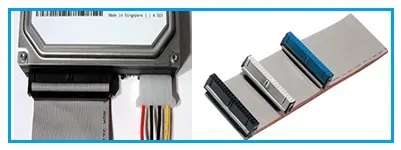 IDE HDD and Cables
Let’s explore the features of IDE/PATA:
- Definition: IDE, also known as PATA (Parallel ATA), was introduced in 1986.
- Hot Plugging: Does not support hot plugging.
- Data Transfer Rates: IDE supports data transfer rates up to 133 Mbps.
- Cables: IDE cables are wider (ribbon cables), about 18 inches long.
- Multiple Devices: Allows connection of more than one hard drive per channel. Multiple IDE devices can be chained together using a ribbon cable.
- Cost: IDE drives tend to be more expensive compared to SATA drives.
Explore Core Memory Concepts & Fundamentals
- Mobile Phone Memory Overview
- RAM vs Cache Memory
- L1 vs L2 vs L3 Cache Memory
- ARM Bus Technology, Memory Types and Peripherals
Continue Learning RAM (Random Access Memory) Architectures & Types
Deep dives into the volatile memory used for active processing, including DDR, Graphics RAM, and emerging MRAM technologies.
- SRAM vs DRAM Memory
- Understanding DDR1 to DDR4 SDRAM
- LPDDR Generations Comparison
- LPDDR5 RAM: Advantages & Disadvantages
- GDDR Memory: Advantages & Disadvantages
- HBM Memory: Advantages & Disadvantages
- MRAM Technology: Types, Benefits, Drawbacks
- Ferroelectric RAM (FRAM) Basics