
What is SSD: Advantages and Disadvantages
Advertisement
A Solid State Drive (SSD) is a data storage device that uses flash memory instead of rotating magnetic disks to store digital information. Its advantages include faster data access, lower power consumption, and greater shock resistance, while its disadvantages include higher cost per gigabyte and limited write endurance.
Key features of SSD
SSD stands for Solid State Drive or Solid State Disk. It uses integrated circuit (IC) assemblies as memory to persistently store data. SSDs come in a variety of sizes and form factors to suit diverse storage devices.
They are used for numerous data storage applications, including cloud storage in data centers. The most common interfaces used are SATA (Serial Advanced Technology Attachment), SAS (Serial Attached SCSI), FC (Fiber Channel), and PCI (Peripheral Component Interconnect). The SATA interface supports data transfer rates from 1 Gbps to 6 Gbps. PCI express and SATA interfaces are widely used in most SSDs.
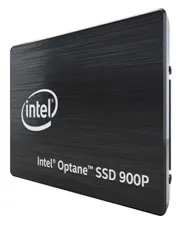 Intel Optane SSD 900P
The image above shows the Intel Optane SSD 900P, a recent release. It supports NVMe and PCIe protocols, resulting in higher performance, although with moderate capacity. Samsung offers the 970 Pro and 970Evo SSDs for consumers. Since 2017, most SSDs have used NAND-based flash memory.
NAND is a non-volatile flash memory, meaning it retains data even when power is off. There are different types of NAND, including SLCs (Single Level Cells), MLCs (Multi Level Cells), and TLCs (Triple Level Cells). Each has its own strengths and weaknesses for SSD applications.
Benefits (Advantages) of SSD
- Speed: SSDs are significantly faster than traditional HDDs because they have no moving mechanical parts. The random access time for an SSD array is around 0.1 ms, compared to 5-10 ms for an HDD.
- Ease of Setup & Low Latency: They’re easy to set up, offer low latency, and provide high storage efficiency.
- Ideal for High Load: SSDs are well-suited for projects with numerous reading and writing operations.
- Quiet & Compact: They produce less noise and are smaller in size because they don’t rely on rotating components.
- Durability & Reliability: SSDs are flash-based and offer longevity, robustness, high-temperature tolerance, operating range, shock and vibration resistance, and lower power consumption.
- No Fragmentation Issues: Fragmentation isn’t a concern, leading to consistent performance.
- Data Loss Resistance: There’s a lower risk of data loss, and they’re more resistant to bumps and drops experienced by mobile users.
Drawbacks (Disadvantages) of SSD
- Cost: SSDs are more expensive than HDDs, and the price increases with storage capacity.
- Lifespan: SSDs generally have a shorter lifespan compared to HDDs.
- Storage Space: They typically offer less storage space than traditional hard disk drives, although recent advances in technology are addressing this issue.
- Performance Degradation: SSDs tend to slow down as they approach their storage capacity. The write performance will decrease as the drive fills up.
Summary
SSDs have transformed modern computing by delivering significantly faster boot times, application performance, and overall system responsiveness compared with traditional hard drives. Their storage advantages improve productivity and reliability, although storage cost and write cycle limitations remain important purchasing considerations.