
What is Thunderbolt Interface: Features, Advantages and Disadvantages
Advertisement
The Thunderbolt interface is a high speed connectivity standard that combines data transfer, video transmission, and power delivery through a single compact cable. Its advantages include exceptional bandwidth, multi device support, and simplified connectivity, while its disadvantages include premium hardware costs, cable compatibility requirements, and limited availability on some devices.
Key features of Thunderbolt Interface
- Thunderbolt is a hardware interface developed by Intel and Apple, designed to connect external peripherals to computers and laptops.
- It’s essentially the successor to the FireWire interface.
- There are three main types of Thunderbolt interfaces: Thunderbolt 1, Thunderbolt 2, and Thunderbolt 3.
- Each version offers different data rates and supports varying cable lengths.
- It’s hot-pluggable, meaning you can connect and disconnect devices while the system is running. It also supports daisy-chaining up to 6 devices.
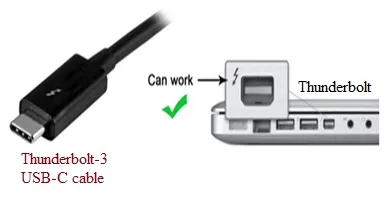 alt: Thunderbolt interface
- Thunderbolt 1 and 2 support 20 Gbps, while Thunderbolt 3 boasts speeds of up to 40 Gbps.
- It supports a maximum distance of up to 100 meters (300 feet).
Benefits or Advantages of Thunderbolt Interface
- Data and Display Integration: The Thunderbolt interface cleverly multiplexes/demultiplexes PCIe (PCI Express) and DP (DisplayPort) lanes using a Thunderbolt controller over a single cable.
- High Data Transfer Rates: Thunderbolt 3 supports data rates of two 20Gbps or 40Gbps over two lanes in each direction. This is significantly faster than USB 3.1 Type-C (10 Gbps) and USB 3.0 (5 Gbps).
- High-Resolution Display Support: It supports high pixel density devices, including dual 4K displays at 60Hz.
- Power Delivery: It delivers more power, making it suitable for fast charging of devices.
- Versatile Applications: It can be used for single-cable docking, external GPU docks with hot-plug support, data transfer & display output, and even networking various systems.
Drawbacks or Disadvantages of Thunderbolt Interface
- Higher Cost: Thunderbolt is a more expensive technology compared to the well-established USB and FireWire interfaces.
- Limited Peripheral Availability: There are fewer peripheral devices available with Thunderbolt interface compared to USB. As a result, users might need to purchase new devices specifically supporting Thunderbolt.
- Limited Daisy Chaining: Thunderbolt supports fewer devices in a daisy chain compared to USB and FireWire. Thunderbolt supports 6 devices, while USB supports 127 and FireWire supports up to 63.
Summary
Thunderbolt technology simplifies modern computing by integrating multiple communication functions into one high-performance interface for storage devices, displays, docking stations, and professional workstations. Its connectivity advantages enhance productivity and flexibility, although compatibility requirements and implementation costs remain important purchasing considerations.