
Matter over Thread vs Wi-Fi: Key Differences
Advertisement
Introduction : To understand the difference between Matter over Thread and Matter over Wi-Fi, it is important to first understand what Matter actually is. Matter is an open source, IP based connectivity standard designed to act as a universal language for the smart home. It is not a new radio frequency; rather, it is a unifying application layer that sits on top of existing wireless technologies. By doing so, it ensures that devices from different ecosystems (like Apple HomeKit, Google Home and Amazon Alexa) can communicate seamlessly with each other.
While Matter uses Bluetooth Low Energy (BLE) for the initial setup (called “commissioning”), the actual day to day data transmission happens over one of two primary network protocols viz. Thread or Wi-Fi.
What is Matter over Thread?
Thread is a low power, low latency, wireless mesh networking protocol. It is specifically designed to accommodate the needs of small, battery operated Internet of Things (IoT) devices that do not need to transmit large amounts of data.
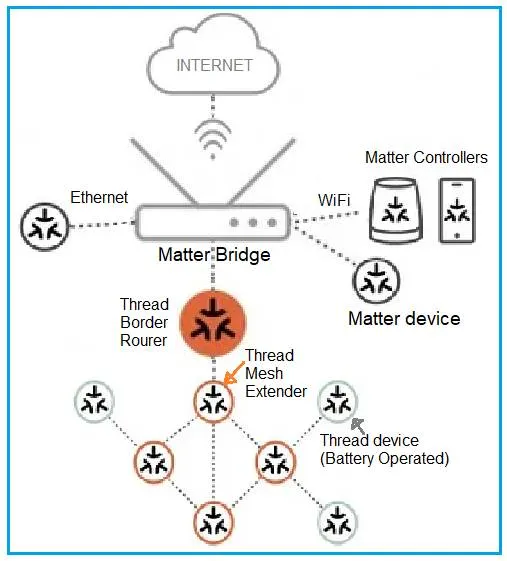
When a device runs Matter over Thread, it participates in a self healing mesh network. Instead of every device communicating directly with a central router, Thread devices can pass messages to one another. If one device falls offline, the network automatically re-routes the signal through another device, making the network highly robust.
Thread Border Router :
Because Thread devices speak a different low power radio language than your standard home Wi-Fi router, they cannot connect to the internet on their own. They require a device called a Thread Border Router. It can be smart speaker, dedicated hub or even a customized Raspberry Pi. The Border Router acts as a bridge, translating the Thread network’s data into standard Wi-Fi/Ethernet data so it can communicate with the broader internet and your smartphone.
Major Applications : Smart locks, motion sensors, door/window contacts, temperature sensors and smart light bulbs.
What is Matter over Wi-Fi?
Wi-Fi is the ubiquitous, high bandwidth local area network technology that we already use for smartphones, laptops and streaming devices.
When a device runs Matter over Wi-Fi, it connects directly to your home’s existing Wi-Fi access point, just like your phone does. It does not require any special bridging hardware or Border Routers because it already speaks the native language of your home network.
Because Wi-Fi is designed to handle massive amounts of data, it is incredibly fast. However, maintaining a continuous Wi-Fi connection requires a significant amount of power. Therefore, Matter over Wi-Fi is generally reserved for devices that are plugged into a wall outlet rather than those running on coin cell batteries.
Major Applications : Security cameras, smart TVs, smart speakers, video doorbells and heavy household appliances.
Key Differences: Matter over Thread vs. Matter over Wi-Fi
Following table mentions side by side comparison of how these two underlying technologies support the Matter standard.
| Feature/Metric | Matter over Thread | Matter over Wi-Fi |
|---|---|---|
| Primary Focus | Low power consumption & reliability. | High bandwidth & fast data transfer. |
| Network Topology | Mesh Network; Devices communicate with each other, extending range dynamically. | Star Network; All devices must communicate directly with the central router. |
| Power Consumption | Ultra-Low; Ideal for devices running on batteries for months or years. | High; Requires continuous power; usually reserved for mains-powered devices. |
| Data Throughput | Low; Typically around 250 kbps. Good for small control commands (e.g., “Turn on light”). | High; Megabits to Gigabits per second. Good for heavy data (e.g., video streaming). |
| Additional Hardware | Required; Needs a Thread Border Router to connect to the Internet/Wi-Fi network. | None; Connects directly to your existing home Wi-Fi router. |
| Range & Scalability | Range improves and network gets stronger as you add more plugged-in Thread devices. | Range is limited by the central Wi-Fi router and requires Wi-Fi extenders to expand. |
| Setup/Commissioning | Uses Bluetooth LE for initial pairing. | Uses Bluetooth LE for initial pairing. |
Summary
Both the protocols are complementary to each other. The architecture of a modern Matter 1.0 smart home utilizes both of these protocols. Hardware engineers and product designers choose Matter over Wi-Fi when they are building a device that handles heavy media and has a constant power supply. They choose Matter over Thread when they are designing a compact, battery reliant sensor where energy efficiency and network resilience are the top priorities.
Compare Matter With Other Technologies
- Matter Over Thread Architecture & its Benefits
- Matter Vs. Zigbee : Key Comparison
- Matter Vs. Thread : Key Differences
Continue Learning Matter Protocol
- What is Matter Protocol?
- How Matter Bridging Works
- Matter Bridge Vs. Matter Controller : Key Differences
- Matter Nodes, Endpoints & Clusters: Data Model Explained
- Matter Commissioning & Discovery - BLE, Wi-Fi, NFC, IP & Thread
- Matter Controller Vs Commissioner: Key Differences
- Matter DAC Vs PAI vs PAA : Certificate Differences
- Matter MRP: Message Reliability Protocol Explained
- Matter QR Code: Base-38 Encoding Language
- Matter Causes & Troubleshooting Guide
- Matter Protocol Evolution : Key Differences
Continue Learning Legacy Wi-Fi (IEEE 802.11b/a/g)
- WLAN Basics Tutorial
- WLAN Physical Layer: 802.11a PHY
- WLAN MAC Layer Part-1
- WLAN MAC Layer Part-2
- WLAN Security Basics, WEP Protocol and Wi-Fi Checklist
- WiFi Radio Frequency Channels: 2.4 GHz, 5 GHz, and 4.9 GHz
- WiFi Roaming: Understanding the Basics
Explore Advanced WLAN Versions : Next Gen. Wi-Fi 4/5/6/7 & 8
- Wi-Fi 4 Physical Layer as per IEEE 802.11n
- Wi-Fi 5 Basics Tutorial as per IEEE 802.11ac
- Wi-Fi 6 Basics Tutorial
- Wi-Fi 7 Architecture & Benefits
- Wi-Fi 8 Pillars and its Benefits
Continue Learning THREAD Technology
- What is Thread in IoT
- Thread Protocol in Home Automation & its stack
- Thread Border Router vs Mesh Extender : Key differences