
Matter Bridging: How Legacy Devices Work With Matter
Advertisement
Based on the Matter Specification, this page explains how Matter Bridging works to integrate legacy devices into a modern smart home ecosystem.
Bringing Legacy Devices into the Future: How Matter Bridging Works
One of the biggest hurdles in adopting any new smart home standard is the fear of leaving old devices behind. Millions of homes are already equipped with perfectly functional Zigbee bulbs, Z-Wave door sensors, and proprietary smart motorized blinds. Replacing all of them to upgrade to Matter would be incredibly expensive and wasteful.
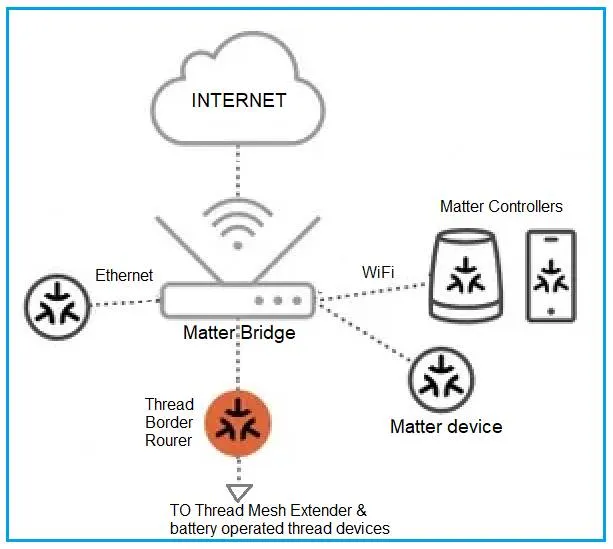
To solve this, the Matter specification includes a powerful feature called Matter Bridging. A Matter Bridge acts as a universal translator, allowing non-Matter IoT devices to seamlessly participate and integrate in a Matter network (i.e. “Fabric”) alongside native Matter devices. Following section describes how Matter Bridges work beneath the surface to unite fragmented smart home ecosystems.
1. The Bridge as a Universal Translator
At its core, a Matter Bridge is a physical device that speaks two or more languages. On one side, it speaks native Matter over Wi-Fi or Ethernet. On the other side, it speaks a non-Matter transport protocol such as Zigbee, Z-Wave or Bluetooth Mesh.
The Bridge’s primary job is bi-directional translation as follows.
-
Matter to Legacy - Incoming Commands: When a Matter Controller (like a smart speaker) says “Turn on the living room lights,” the Bridge receives this Matter command, translates it into the corresponding Zigbee or Z-Wave command, and beams it out to the legacy bulbs.
-
Legacy to Matter - Outgoing Statuses: When a legacy temperature sensor detects a change, it sends its proprietary signal to the Bridge. The Bridge translates this data into a standardized Matter attribute report and broadcasts it to the Matter network.
To the end user and the Matter Controller, the legacy devices look and behave exactly as if they were native Matter devices.
2. The Architecture: Nodes, Aggregators and Endpoints
To understand how a Bridge exposes legacy devices to a Matter network, we have to look at the Matter Data Model hierarchy.
A Bridge joins the Matter network as a single Node. Inside that Node, it uses a specific structural layout to organize the legacy devices:
-
The Aggregator Endpoint: The Bridge exposes a special virtual component called an “Aggregator.” Think of this as the main directory for the Bridge.
-
Bridged Device Endpoints: Underneath the Aggregator, the Bridge creates a unique “Endpoint” for every single legacy device connected to it.
-
The PartsList: The Aggregator maintains a “PartsList” i.e. dynamic inventory of all the endpoints underneath it. If you add a new Zigbee switch to your Bridge, the Bridge automatically updates its “PartsList” to announce the new device to the Matter network.
3. Preserving Device Identity
When a legacy device is bridged into Matter, it doesn’t lose its identity. The specification requires the Bridge to expose a Bridged Device Basic Information Cluster for each legacy endpoint.
This cluster stores crucial metadata about the legacy device, pulling it directly from the non-Matter protocol if available. This includes following.
- “VendorName” (e.g., the company that made the Zigbee bulb)
- “NodeLabel” (e.g., the custom name you gave the bulb, like “Reading Lamp”)
- “Reachable” status (whether the Bridge can currently communicate with the legacy device)
This ensures that your Matter controller app displays accurate names and statuses for your legacy hardware, rather than just showing a list of generic, nameless endpoints.
4. Single-Pass Commissioning
One of the most user friendly aspects of Matter Bridging is how setup is handled.
If you have 50 Zigbee lights connected to a Bridge, you do not have to scan 50 QR codes to bring them into your Matter network. Because the Bridge itself is just a single Matter Node, you only go through the Matter commissioning process once for the Bridge itself.
Once the Bridge is securely commissioned and given its Node Operational Certificate (NOC), it instantly exposes all 50 lights to the Matter Fabric via its endpoints. If you add a 51st light to the Bridge later using the manufacturer’s proprietary app, the Bridge automatically updates its internal list, and the new light seamlessly appears in your Matter smart home apps without requiring a new pairing code.
5. Maintaining Logical Grouping and Rooms
Many users already have their legacy devices organized into rooms or zones (e.g. “Kitchen Lights”) inside the bridge manufacturer’s proprietary app.
Matter bridges can preserve this topology using the Actions Cluster. If the Bridge knows that three specific bridged bulbs belong to the “Bedroom,” it can expose this logical grouping to the Matter Fabric. When a Matter Controller wants to turn off the “Bedroom,” it can send a single command to the group, and the Bridge will efficiently execute the action across the required legacy endpoints.
Summary
Matter Bridging ensures that adopting the new standard does not mean discarding old investments. By using clever Data Model structures like Aggregator endpoints and Bridged Device Information clusters, manufacturers can build translators that allow Zigbee, Z-Wave and proprietary devices to live harmoniously inside a secure and modernized Matter Fabric.
Continue Learning Matter Protocol
- What is Matter Protocol?
- Matter Bridge Vs. Matter Controller : Key Differences
- Matter Nodes, Endpoints & Clusters: Data Model Explained
- Matter Commissioning & Discovery - BLE, Wi-Fi, NFC, IP & Thread
- Matter Controller Vs Commissioner: Key Differences
- Matter DAC Vs PAI vs PAA : Certificate Differences
- Matter MRP: Message Reliability Protocol Explained
- Matter QR Code: Base-38 Encoding Language
- Matter Security: PASE vs CASE vs DAC Explained
- Matter Causes & Troubleshooting Guide
- Matter Protocol Evolution : Key Differences