
Matter Commissioning & Discovery: BLE, Wi-Fi, NFC, IP & Thread
Advertisement
Based on the Matter 1.6.1 Core Specification, “Commissioning” is the official term for what consumers usually call “pairing” or “setup.” However, unlike older smart home protocols where pairing was a simple, often insecure handshake, Matter commissioning is a highly orchestrated, cryptographic process.
It takes a device from a factory new, untrusted state to a fully authenticated, operational member of your smart home network (the “Fabric”).
Here is an original, step by step breakdown of how Matter commissioning works, including the diverse ways devices can be discovered across different wireless transports.
Step 1: Device Discovery across BLE, Wi-Fi, NFC, Thread & IP
Before a smartphone or hub (the Commissioner) can securely set up a new device (the Commissionee), it has to find it. Because Matter supports a massive variety of hardware from hardwired smart TVs to tiny battery powered sensors; the 1.6.1 specification defines five distinct discovery methods.
When powered on in setup mode, the device broadcasts a “Discriminator” (a 12-bit code derived from its setup QR code) and its Vendor/Product IDs so the controller knows what it is looking at.
Here is how discovery happens across the different transport technologies:
-
Bluetooth Low Energy (BLE): This is the most common method for Wi-Fi and Thread devices. The device broadcasts a specific Bluetooth service (UUID “0xFFF6”). Because BLE packets are small, Matter uses a custom protocol called BTP (Bluetooth Transport Protocol) to chop up and reassemble the larger secure Matter messages over the Bluetooth connection.
-
Wi-Fi Public Action Frames (PAF): A newer, advanced method using the PAFTP (Public Action Frame Transport Protocol). This allows a commissioner to discover and talk to a Wi-Fi device directly without the device needing to join the local Wi-Fi router first or requiring a Bluetooth chip. It uses Wi-Fi Alliance Unsynchronized Service Discovery (WFA-USD) on standard 2.4 GHz or 5 GHz channels.
-
NFC (Near Field Communication): For a true “tap to pair” experience, devices can use the NFC Transport Layer (NTL). When you tap your phone to the device, it uses standard ISO-DEP data blocks (similar to tap to pay credit cards) to transmit the setup messages.
-
Thread Commissioning Protocol: If a device only has a Thread radio (and no BLE), the Matter Commissioner actually petitions the existing Thread network to become the “Thread Commissioner.” It broadcasts a mathematical “Bloom filter” containing the device’s discriminator. The new device sees this, provisionally joins the Thread network and begins the setup.
-
IP Network (mDNS): If the device is already plugged into Ethernet, or previously connected to Wi-Fi, it uses standard IP discovery (DNS-SD/mDNS). It broadcasts a service called “matterc.udp” on the local network, allowing any controller on the same Wi-Fi to see it instantly.
Step 2: The Secure Handshake (PASE)
Once the Commissioner finds the device via one of the five transport mechanisms mentioned above, it needs to establish a secure tunnel.
It does this using PASE (Passcode Authenticated Session Establishment). When you scan the device’s QR code (or type in the 11- or 21-digit manual code), the app reads the device’s secret setup Passcode. Using an advanced cryptographic algorithm (SPAKE2+), the app and the device prove to each other that they know the passcode without ever transmitting the passcode in plain text. This generates temporary encryption keys, creating a secure tunnel.
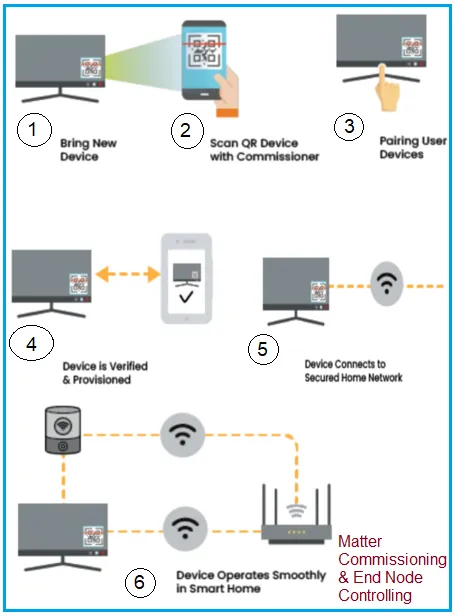
Step 3: The Background Check (Device Attestation)
Now that the tunnel is secure, the Commissioner performs a background check to ensure the device is not a malicious counterfeit.
The Commissioner asks the device for its Device Attestation Certificate (DAC); a cryptographic birth certificate injected into the silicon at the factory. The device signs a random challenge using its hidden private key. The Commissioner verifies this signature and checks the certificate against the Distributed Compliance Ledger (DCL) to confirm the manufacturer is certified by the Connectivity Standards Alliance (CSA).
Step 4: Network Provisioning
Assuming the device passes the background check, the Commissioner configures the device’s basic settings (like regulatory domain and timezone).
Crucially, if the device was discovered over Bluetooth, NFC or Wi-Fi PAF, it isn’t actually on your home network yet. In this step, the Commissioner securely sends your home Wi-Fi password or Thread network credentials through the encrypted PASE tunnel. The device applies these credentials and connects to your local router or Thread Border Router.
Step 5: Issuing the Local Passport (Operational Credentials)
Now that the device is on your Wi-Fi or Thread network, it needs a way to prove it belongs to your specific home.
The Commissioner generates a new, unique certificate specifically for your home; i.e. Node Operational Certificate (NOC) and installs it on the device. Think of this as the device’s local passport.
Step 6: Switching to CASE and Finalizing
The Commissioner now tears down the temporary Bluetooth/NFC/PAF connection and the temporary PASE security tunnel.
It locates the device on the local Wi-Fi or Thread network using its new IP address and establishes a permanent, operational secure tunnel called CASE (Certificate Authenticated Session Establishment). CASE relies entirely on the new “local passports” (NOCs).
The Commissioner sends a final “CommissioningComplete” command over the operational network. The device disarms its internal fail safe timer, exits setup mode, and is now ready to be controlled, automated and shared.
Continue Learning Matter Protocol
- What is Matter Protocol?
- How Matter Bridging Works
- Matter Bridge Vs. Matter Controller : Key Differences
- Matter Nodes, Endpoints & Clusters: Data Model Explained
- Matter Controller Vs Commissioner: Key Differences
- Matter DAC Vs PAI vs PAA : Certificate Differences
- Matter MRP: Message Reliability Protocol Explained
- Matter QR Code: Base-38 Encoding Language
- Matter Security: PASE vs CASE vs DAC Explained
- Matter Causes & Troubleshooting Guide
- Matter Protocol Evolution : Key Differences