How to Build a Multi-Fabric Matter 1.0 Network
Advertisement
Before the release of the Matter 1.0 standard, building a smart home meant pledging allegiance to a single brand. If you bought a smart bulb designed for Apple HomeKit, getting it to respond to an Amazon Echo speaker or a Google Nest Hub was either impossible or required complicated, clunky third party cloud integrations.
Matter 1.0 solves this through its most powerful capability i.e. The Multi Admin (Multi-Fabric) feature.
This feature allows a single smart home accessory to be simultaneously connected to and controlled by, completely different consumer ecosystems without them interfering with one another. Let us understand how “fabrics” work and how to set up a multi-fabric network.
What is a “Fabric” in Matter?
In the Matter specification, an ecosystem (such as Apple Home, Google Home, Samsung SmartThings or a custom developer platform) is referred to as a Fabric.
A Fabric is essentially a secure, closed logical network. Every device within a specific fabric shares the same top level security certificate (Root of Trust). Historically, devices could only live in one fabric at a time.
The breakthrough of Matter’s Multi-Admin feature is that a single Matter device can join multiple fabrics simultaneously. For example, a smart thermostat can exist in your Apple Home fabric (so you can control it via Siri on your iPhone) and your Google Home fabric (so your partner can control it via their Android phone) at the exact same time.
Importantly, each fabric operates completely independently. They handle their own encrypted communications and the controllers (e.g. Apple and Google) do not share your private data with one another. The device itself simply listens to commands from both.
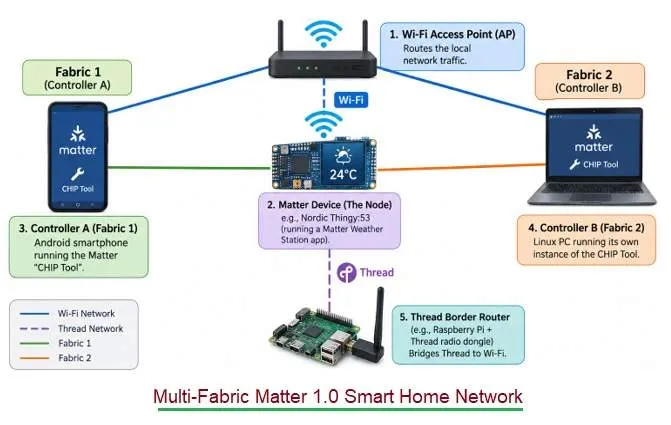
Prototyping a Multi-Fabric Network: A Developer’s Setup
If you are an engineer or hobbyist looking to build and test a multi-fabric network, you don’t actually need commercial smart speakers. You can simulate multiple ecosystems using prototyping hardware and software tools.
Requirements of Setting-Up Multi-Fabric Matter 1.0 Network:
- A Wi-Fi Access Point (AP): To route the local network traffic.
- A Matter Device (The Node): For example, a Nordic Thingy:53 (running a Matter Weather Station app) or an nRF5340 Development Kit acting as a smart light bulb.
- Controller A (Fabric 1): An Android smartphone running the Matter “CHIP Tool” (a developer app used to commission and send Matter messages).
- Controller B (Fabric 2): A Linux PC running its own instance of the CHIP Tool.
- A Thread Border Router: If your device uses Thread instead of Wi-Fi, you will need a Border Router (often built using a Raspberry Pi and a USB radio dongle) to bridge the Thread network to your Wi-Fi network.
Step-wise Guide : Commissioning a Device to Multiple Fabrics
Here is the exact workflow for connecting one device to two separate ecosystems.
Step 1: Commission the Device to Fabric 1
When you turn on your brand new Matter device, it broadcasts its presence using Bluetooth Low Energy (BLE). Using Controller A (your Android smartphone), you scan the device’s setup QR code. The smartphone uses BLE to securely pass your Wi-Fi or Thread network credentials to the device. The device connects to the network, and the smartphone acts as the administrator for Fabric 1. You can now control the device from the phone.
Step 2: Open the “Commissioning Window”
You cannot simply scan the same QR code with Controller B (the Linux PC) to add it to a second network. For security reasons, the device’s BLE pairing mode turns off after the first setup to prevent hackers from hijacking it. Instead, you must use Controller A to open a new commissioning window. Controller A asks the device to generate a new, temporary, secure setup code specifically for the second ecosystem.
Step 3: Commission the Device to Fabric 2
Now, you take Controller B (the Linux PC). Using the newly generated setup code from Step 2, Controller B securely authenticates the device. Because the device is already on your local Wi-Fi/Thread network, it doesn’t need network credentials again. Instead, Controller B assigns it a new “Node ID” specific to Fabric 2.
Step 4: Simultaneous Control
The setup is complete. The Nordic Thingy:53 (or smart bulb) is now officially part of two fabrics.
- If you send a “read temperature” or “turn on lights” command from the Android phone, the device responds.
- If you send the same command from the Linux PC, the device responds.
Conclusion
The Multi-Fabric capability is a massive leap forward for both consumers and developers.
For consumers, it ends household ecosystem wars. Roommates with iPhones and Androids can seamlessly share control of the apartment’s smart locks and lights without having to download third party apps or create new accounts.
For IoT developers, it drastically reduces development costs. Instead of maintaining separate codebases, hardware SKUs, and certifications for Apple, Amazon and Google, engineers can build a single Matter certified device using an SDK (like the nRF Connect SDK). That single device is guaranteed to work across every major smart home fabric on the market, right out of the box.
Continue Learning Matter Protocol
- How Matter Bridging Works
- Matter Bridge Vs. Matter Controller : Key Differences
- Matter Nodes, Endpoints & Clusters: Data Model Explained
- Matter Commissioning & Discovery - BLE, Wi-Fi, NFC, IP & Thread
- Matter Controller Vs Commissioner: Key Differences
- Matter DAC Vs PAI vs PAA : Certificate Differences
- Matter MRP: Message Reliability Protocol Explained
- Matter QR Code: Base-38 Encoding Language
- Matter Security: PASE vs CASE vs DAC Explained
- Matter Causes & Troubleshooting Guide
- Matter Protocol Evolution : Key Differences