
Bluetooth L2CAP vs. HCI Layers : Key differences
Advertisement
Based on Bluetooth Core Specification and general knowledge of networking, this page explains Bluetooth L2CAP(Logical Link Control and Adaptation Protocol) and Bluetooth HCI (Host Controller Interface) and explore key difference between them. The Bluetooth protocol stack is divided into two main sections: the Host (the upper software layers, typically running on a CPU/OS) and the Controller (the lower hardware layers, typically a Bluetooth radio chip). Both L2CAP and HCI fit into this architecture.
Bluetooth L2CAP (Logical Link Control and Adaptation Protocol)
It sits within the ‘Host’, directly above the HCI and below upper layer protocols (like ATT, SMP, SDP and RFCOMM).
L2CAP is a fundamental data protocol. Because the lower layers of Bluetooth only provide a basic pipe for transmitting data, L2CAP is required to manage, format and route that data so multiple applications can use the Bluetooth radio simultaneously.
Key functions of L2CAP :
-
Protocol/Channel Multiplexing: L2CAP allows multiple upper-layer protocols and applications to share a single physical Bluetooth link. It uses Channel Identifiers (CIDs) to route incoming data to the correct higher-layer protocol (e.g. routing ATT data to the GATT profile or SDP data to the Service Discovery process).
-
Segmentation and Reassembly (SAR): Upper-layer applications often send large chunks of data (up to 64 kilobytes). The underlying Bluetooth radio cannot send this all at once. L2CAP takes large Service Data Units (SDUs), breaks them down (segments them) into smaller Protocol Data Units (PDUs) for transmission, and reassembles them on the receiving end.
-
Flow Control & Error Control: L2CAP ensures reliable data delivery. It provides per-channel flow control (like LE Credit Based Flow Control) and retransmissions (Enhanced Retransmission Mode) to recover from lost or corrupted packets.
-
Quality of Service (QoS): L2CAP manages QoS contracts, ensuring that time sensitive data (like streaming audio) gets the priority and bandwidth it requires.
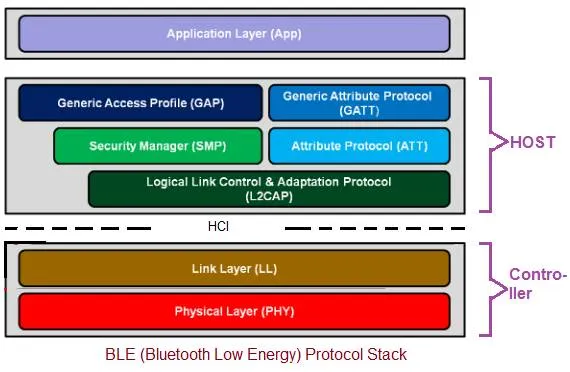
Figure depicts BLE protocol layers, radio sits below PHYSICAL LAYER (i.e. Baseband layer) which is not shown in the figure.
Bluetooth HCI (Host Controller Interface)
It sits right at the boundary between the Host (software) and the Controller (hardware).
HCI is not a data formatting protocol like L2CAP; it is a standardized interface and command set. It defines exactly how the Host communicates with the Bluetooth Controller chip. Regardless of who makes the Bluetooth chip, the operating system (Host) uses HCI to give it instructions.
Key functions of HCI :
-
Command and Event Handling: The Host uses HCI to send commands to the Controller (e.g. “Start scanning,” “Establish a connection,” “Change transmit power”). The Controller uses HCI to send events back to the Host (e.g. “Device discovered,” “Connection established,” “Encryption changed”).
-
Data Transport: HCI acts as the physical/logical transport bus (often utilizing hardware interfaces like USB, UART, or SDIO) to move data between the Host and the Controller.
-
HCI Fragmentation: As noted in the specification, the HCI driver may further fragment L2CAP PDUs to fit into specific HCI ACL (Asynchronous Connection-Less) data packets to meet the strict sizing constraints of the Controller.
Summary Comparison: L2CAP vs. HCI
| Feature | Bluetooth L2CAP | Bluetooth HCI |
|---|---|---|
| Full Name | Logical Link Control and Adaptation Protocol | Host Controller Interface |
| Nature | A Protocol for formatting and routing data. | An Interface for Host-to-Controller communication. |
| Location | Inside the Bluetooth Host (upper stack). | The Boundary connecting the Host and Controller. |
| Primary Purpose | Multiplexing channels, fragmenting/reassembling data, and managing flow control. | Standardizing how the OS talks to the Bluetooth radio chip (commands, events, data transport). |
| Data Handling | Packages large application data (SDUs) into smaller L2CAP packets (PDUs). | Takes L2CAP PDUs and transports them as HCI ACL/Isochronous data packets across the hardware bus. |
| Analogy | It can be think of as similar to mail room in which mails are sorted by department (multiplexing), packages large items into smaller boxes (segmentation), and ensures delivery (flow control). | It can be similar to delivery truck which simply takes the boxes from the mailroom and physically drives them to the local distribution center (the radio). |
How Data Flow through these layers
- Let us take example that you want to send a large file to another device.
At the Trasmit End :
- Application Layer: The Application sends these data to an upper protocol (like GATT). GATT passes the data to L2CAP.
- L2CAP (Host): Receives the large file. It assigns it a specific Channel ID (multiplexing) so the receiving device knows what the data is. It then chops the large file down into smaller L2CAP PDUs (Segmentation).
- HCI (Boundary): The Host passes these L2CAP PDUs across the HCI bus to the Controller. The HCI driver might wrap these into even smaller HCI ACL Data Packets.
- Controller (Radio): The Bluetooth chip receives the HCI packets, schedules them, and transmits them over the air via radio waves.
At the Receive End :
At the receiving device, the process happens in reverse. The receiving Controller sends the packets up across its HCI to its Host. The receiving L2CAP strips the headers, reassembles the fragments, and routes the complete file to the correct application using the Channel ID.
Continue Learning Bluetooth MAC Layer
- Bluetooth Low Energy (BLE) Advertising Data Channels
- Bluetooth Low Energy (BLE) Advertising Data Packet Formats
- Bluetooth Low Energy (BLE) Advertising Event Types
- Bluetooth Low Energy (BLE) Link Layer States
- Bluetooth Low Energy (BLE) State Diagram
- What is UUID in Bluetooth Low Energy (BLE)
Continue Learning Bluetooth Basic Concepts
- What are new features in Bluetooth 6.3 Version
- Bluetooth GATT Vs. ATT Vs. GAP : Key Comparison
- Bluetooth Service Vs. Characteristic Vs. Descriptor
- Bluetooth Central Vs. Peripheral : Key Differences
- Bluetooth pairing Vs. Bonding Phase
- Bluetooth Notifications Vs. Indications
- Bluetooth Channel Sounding Vs. RSSI
- Bluetooth Error Codes Guide : Meanings, Causes & Fixes
Continue Learning Bluetooth Technology
- Bluetooth Basics Tutorial
- Bluetooth Low Energy (BLE) Basics Tutorial
- Bluetooth Protocol Stack & Device State Diagram
- Bluetooth Physical Layer Modules
- Bluetooth Channel Frequency List
- Bluetooth Network Security
- Bluetooth Low Energy (BLE) Connection Establishment Procedure
- Bluetooth Profiles: HFP, HSP, A2DP, AVRCP, PBAP & MAP
- Bluetooth Mesh Node Types & Protocol Stack Layer Functions
- Comparison Between All Bluetooth Versions from 1.0 to 6.3
Explore Bluetooth Calculators
- Bluetooth Direction Finding Calculator : AoA and AoD
- Bluetooth Channel Sounding (CS) Ranging Calculator : Phase based Vs. RTT
- Bluetooth Range Estimation using RSSI Calculator
- Bluetooth Location Tracking (Trilateration) Calculator
Explore Deep Insight Bluetooth Technology
- Bluetooth AFH Explained: Adaptive Frequency Hopping & FAQs
- Bluetooth Error Recovery : ARQ, ACK, NAK
- Bluetooth Bit Stream Processing: HEC, CRC, FEC & More
- Bluetooth Routing: How Devices Know a Packet is for Them
- Bluetooth Flow Control: Understanding GO & STOP Bits
- Bluetooth Power Management: Sniff, Hold & Active Modes
- Bluetooth Packets Decoded: Structure, Types & Routing
- Decoding Bluetooth Packet Types: Control, ACL, SCO & eSCO