
Bluetooth Packets Decoded: Structure, Types & Routing
Advertisement
Introduction : Whenever you stream music, type on a wireless keyboard, or send a file over Bluetooth Classic (BR/EDR), your devices are exchanging thousands of microscopic digital envelopes every second. In network engineering, we call these envelopes as packets.
If you are building a custom Bluetooth stack, debugging a connection issue or studying wireless security, you need to know exactly how these packets are structured. Every Bluetooth BR/EDR packet is built sequentially from the least significant bit (LSB) to the most significant bit (MSB) and consists of three primary components viz. Access Code, Header and the Payload. Let’s break down the anatomy of a Bluetooth packet and decode the vital fields inside.
1. The Access Code
Before a device can read any data, it has to realize a packet is actually being sent. The Access Code (typically 68 or 72 bits long) is the very first thing transmitted over the air.
- What it does: It acts as a wake up call and a synchronization pulse. The receiver’s radio constantly listens to the airwaves. When it detects a specific pattern of bits that matches the expected Access Code, it “triggers,” syncing its timing to the incoming transmission.
- Identification: The Access Code is derived from the Central device’s unique Bluetooth Address (specifically, the Lower Address Part, or LAP). This ensures that a device only wakes up for packets belonging to its specific piconet, ignoring background noise or packets from a neighboring Bluetooth network.
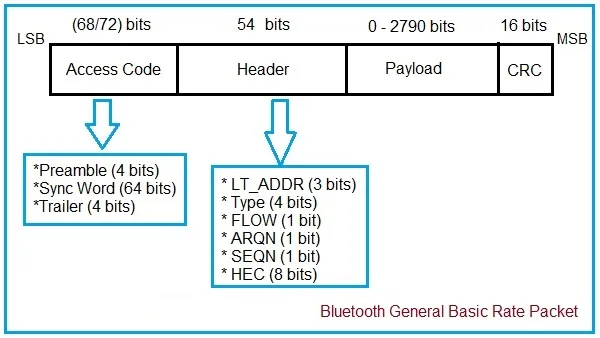
The figure depicts bluetooth General Basic Rate packet format. As shown, bluetooth packet consists of access code, header and payload (including CRC).
2. The Header
Immediately following the Access Code is the Header. Natively, the header is only 18 bits of information. However, because routing data is so critical, Bluetooth applies a 1/3 Forward Error Correction (FEC) scheme; meaning each bit is repeated three times. This results in a highly robust 54 bit Header.
The Header acts as the shipping label for the packet. It contains five crucial fields viz. LT_ADDR, TYPE, ARQN, SEQN and HEC.
LT_ADDR (Logical Transport Address) - 3 bits
A single Central device can actively connect to up to seven Peripherals at once. The LT_ADDR acts as the specific mailbox number for the receiving device.
- Values
1through7address specific, active Peripherals. - An
LT_ADDRof0is reserved for broadcast messages meant for everyone listening.
TYPE (Packet Type) - 4 bits
This field tells the receiver exactly what kind of “box” is arriving. With 4 bits, there are 16 possible packet types. The TYPE field defines three critical things:
- The Transport: Is this an ACL packet (standard data) or a SCO/eSCO packet (real-time audio)?
- The Size: Does this packet take up 1, 3 or 5 time slots on the radio frequency?
- The Coding: Does the payload include Forward Error Correction (FEC) to help fix errors, or is it uncoded for maximum speed? (e.g., a
DM1packet includes FEC, while aDH1packet does not).
FLOW (Flow Control) - 1 bit
This bit helps to prevent memory buffer overflows during data transfers. A 1 (GO) tells the sender to keep transmitting, while a 0 (STOP) warns that the receiver’s memory is currently full and to temporarily pause sending data.
ARQN (Acknowledgment Request Number) - 1 bit
Bluetooth uses an Automatic Repeat Request (ARQ) system to ensure data arrives safely. The ARQN bit is the delivery receipt.
- If a device successfully receives a packet, it sets the
ARQNbit to1(ACK) in its next outgoing packet. - If the packet is corrupted or missed, the bit is set to
0(NAK), prompting the sender to try again.
SEQN (Sequence Number) - 1 bit
Because Bluetooth relies heavily on retransmissions (thanks to ARQN), there is a risk of a device accidentally accepting the same packet twice. The SEQN bit acts as a simple toggle switch (flipping between 0 and 1 for each new packet). If a receiver sees two consecutive packets with the same SEQN, it knows the second one is a duplicate retransmission and safely discards the payload while still sending an ACK.
HEC (Header Error Check) - 8 bits
Before the receiver trusts any of the routing data above, it must verify the HEC. This is an 8-bit checksum calculated mathematically based on the previous 10 header bits and the Central’s device address. If the HEC fails, the receiver assumes the header is corrupted and instantly drops the entire packet, returning to sleep to save battery.
3. The Payload & CRC
If the Access Code matches and the Header passes the HEC check, the device finally looks at the Payload.
The Payload (0 to 2790 bits)
This is the actual cargo which can be keystroke from your keyboard or slice of MP3 audio or the L2CAP control command. Depending on the TYPE specified in the header, the payload can be completely empty (like in a NULL or POLL packet used just for network pinging) or carry up to 2790 bits of data in a 5-slot Enhanced Data Rate (EDR) packet.
CRC (Cyclic Redundancy Check) - 16 bits
While the HEC protects the Header, the CRC protects the Payload.
Attached to the very end of the data payload in ACL and eSCO packets is a 16-bit CRC code. Once the payload is fully received, the receiver runs its own mathematical calculation on the data.
- If the receiver’s math matches the 16-bit
CRCattached to the packet, the data is declared pristine, and anARQN=1(ACK) is queued up. - If a microwave oven or Wi-Fi router transmitted the signal and flipped even a single bit in the payload, the
CRCwill fail. The data is discarded, and the receiver queues anARQN=0(NAK) to ask for a fresh copy.
Summary
To summarize the lifecycle of a packet:
- The Access Code wakes up the correct device.
- The Header provides the
LT_ADDR(who it’s for), theTYPE(what shape it is), and theSEQN/ARQN(tracking and receipts), all validated by theHEC. - The Payload delivers the user data, validated for corruption by the
CRC.
References & Further Reading
- Bluetooth SIG : Bluetooth Core Specification Version 6.3, May 5, 2026.
- Bluetooth SIG : Bluetooth Core Specification change history
- Bluetooth SIG : Bluetooth Technology Overview
Continue Learning Decoding of Different Types of Bluetooth Packets
Continue Learning Bluetooth Basic Concepts
- What are new features in Bluetooth 6.3 Version
- Bluetooth GATT Vs. ATT Vs. GAP : Key Comparison
- Bluetooth Service Vs. Characteristic Vs. Descriptor
- Bluetooth Central Vs. Peripheral : Key Differences
- Bluetooth pairing Vs. Bonding Phase
- Bluetooth Notifications Vs. Indications
- Bluetooth Channel Sounding Vs. RSSI
- Bluetooth Direction Finding Methods : AoA Vs. AoD
- Bluetooth HID Over GATT
- Bluetooth IRK Vs. LTK : Key Differences
- Bluetooth PHY : 1M Vs. 2M Vs. Coded Differences
- What is ATT MTU Size in Bluetooth
- Bluetooth Ranging : Phase Based Vs. RTT Based
- Bluetooth Error Codes Guide : Meanings, Causes & Fixes
- Bluetooth L2CAP and HCI : Key Differences
Continue Learning Bluetooth Technology
- Bluetooth Basics Tutorial
- Bluetooth Low Energy (BLE) Basics Tutorial
- Bluetooth Protocol Stack & Device State Diagram
- Bluetooth Physical Layer Modules
- Bluetooth MAC Layer Overview
- Bluetooth Channel Frequency List
- Bluetooth Network Security
- Bluetooth Low Energy (BLE) Connection Establishment Procedure
- Bluetooth Profiles: HFP, HSP, A2DP, AVRCP, PBAP & MAP
- Bluetooth Mesh Node Types & Protocol Stack Layer Functions
Compare Bluetooth With Other Technologies
- Bluetooth V5.0 Vs. V5.1 Vs. V5.2 Vs. V5.3
- Bluetooth Vs BLE : Key Differences
- Bluetooth Vs UWB Technology : Key Differences
- Bluetooth Vs Wi-Fi Vs UWB
- Comparison Between All Bluetooth Versions from 1.0 to 6.3
Explore Deep Insight Bluetooth Technology
- Bluetooth AFH Explained: Adaptive Frequency Hopping & FAQs
- Bluetooth Error Recovery : ARQ, ACK, NAK
- Bluetooth Bit Stream Processing: HEC, CRC, FEC & More
- Bluetooth Routing: How Devices Know a Packet is for Them
- Bluetooth Flow Control: Understanding GO & STOP Bits
- Bluetooth Power Management: Sniff, Hold & Active Modes