
Interleaver and Deinterleaver Implementation in MATLAB
By RF Wireless Expert Team
Advertisement
This document presents MATLAB source code for implementing an interleaver and its corresponding deinterleaver. The deinterleaver is used to validate the functionality of the interleaver.
Setting Up Input Parameters
First, we need to set up the parameters required for the interleaver module to function correctly.
clc;
clear all;
Ndatasc = 192;   % Number of data subcarriers in the IFFT symbol
mod_type = input('Enter the modulation type[1 for BPSK,2 for QPSK,4 for 16QAM,6 for 64QAM]: ');
ncbps = Ndatasc * mod_type; % Number of coded bits per symbol, based on the number of data carriers in the OFDM symbol
ncpc = mod_type;      % Number of coded bits per carrier
x = randint(ncbps, 1, [1, 0]); % Generating binary data (ones and zeros)
interleaver_input = x';  % Interleaver binary input
Interleaver MATLAB Code
The following code implements the interleaver.
% Interleaver PART
s = ceil(ncpc / 2);
k = 0:ncbps - 1; % First permutation of interleaver
m = (ncbps / 12) * mod(k, 12) + floor(k / 12); % Second permutation of interleaver
n = s * floor(m / s) + mod(m + ncbps - floor(12 * m / ncbps), s);
interleaved_data_out(n + 1) = interleaver_input(k + 1);  % OUTPUT of interleaver
Deinterleaver MATLAB Code
Here’s the MATLAB code for the deinterleaver, which reverses the interleaving process.
% Deinterleaver PART
j = 0:ncbps - 1;
s = ceil(ncpc / 2); % First de-permutation of de-interleaver
d = s * floor(j / s) + mod(j + floor(12 * j / ncbps), s); % Second de-permutation of de-interleaver
e = 12 * d - (ncbps - 1) * floor(12 * d / ncbps);
deinterleaver_data_out(e + 1) = interleaved_data_out(j + 1);
OUTPUT Plots in MATLAB
This section provides the MATLAB code to plot the input, interleaved output, and deinterleaved output data.
% Plotting data
subplot(4, 1, 1), plot(1:length(interleaver_input), interleaver_input);
title('INTERLEAVER INPUT');
xlabel('binary input index');
ylabel('binary data');

subplot(4, 1, 2), plot(1:length(interleaved_data_out), interleaved_data_out);
title('INTERLEAVER OUTPUT');
xlabel('binary input index');
ylabel('binary data');

subplot(4, 1, 3), plot(1:length(deinterleaver_data_out), deinterleaver_data_out);
title('DE-INTERLEAVER OUTPUT');
xlabel('binary input index');
ylabel('binary data');

subplot(4, 1, 4), plot(1:length(deinterleaver_data_out), (interleaver_input - deinterleaver_data_out));
title('Difference between Interleaver-IN and Deinterleaver-OUT/');
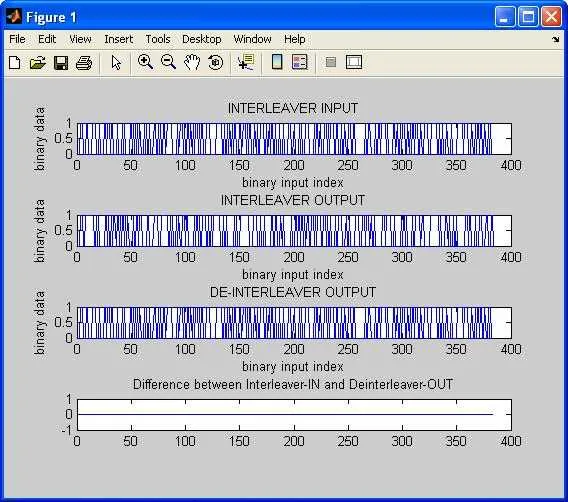
Here’s what the input to the interleaver looks like:

And here’s a sample output from the interleaver and deinterleaver:
Explore MATLAB Coding, Sync & Estimation
- 5G NR Gold Sequence (MATLAB)
- M-Sequence Generator for 5G NR (MATLAB)
- Pseudorandom Noise (PN) Sequence Basics (MATLAB Code)
- Scrambler / Descrambler (MATLAB Code)
- Convolutional Encoder (MATLAB Source Code)
- Viterbi Decoder (MATLAB Source Code)
- CTC Convolutional Turbo Code Basics in MATLAB
- Reed-Solomon Encoder in MATLAB
- CRC (MATLAB Source Code)
- Interleaver / Deinterleaver in MATLAB
- AES Basics (MATLAB Code)
- OFDM Preamble Generation in MATLAB
- Time Offset Estimation OFDM in MATLAB
- OFDM Frequency Offset Estimation in MATLAB
- OFDM Channel Estimation & Equalization in MATLAB
- PAPR Reduction PTS Algorithm in MATLAB