
WLAN Beacon Frames: Functionality and Fields
Advertisement
Like other networks, a beacon frame in WLAN announces the availability of the network (i.e., an Access Point Router). It’s also used for maintenance tasks.
These beacon frames are transmitted at regular intervals so that mobile stations (i.e., stations or any WLAN clients, such as laptops, tablets, or any Wi-Fi gadgets) can find and identify the network. This helps WLAN devices match their parameters with the network, allowing them to join. The Access Point (AP) transmits the beacon frame in infrastructure networks. Therefore, stations need to be near the AP to receive the beacon frame.
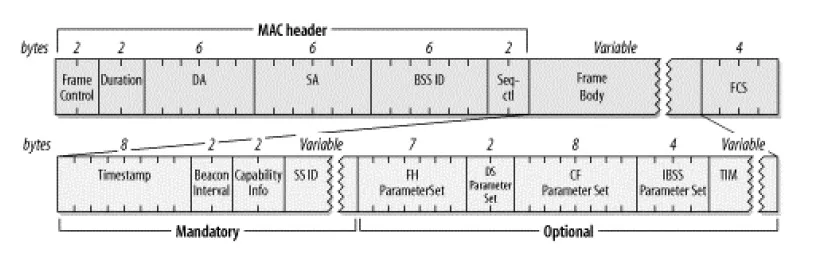
WLAN Beacon Frame Fields
Figure 1 shows the fields carried by a WLAN beacon frame. Note that not all fields are present in all beacon frames. Frame fields may vary depending on the application and physical layer in use. FH and DS parameter sets are used based on the FH or DS physical layers, respectively. It’s important to note that at any given time, only one physical layer will be present in a WLAN station or AP (either FH or DS).
Table 1 below outlines the fields carried within the WLAN beacon frame’s body. The frame body is divided into mandatory and optional fields.
WLAN Beacon Frame Body Fields
| Field | Description |
|---|---|
| Timestamp | - |
| Beacon Interval | - |
| Capability Info | - |
| SSID | - |
| FH parameter set | This WLAN information element is present when the FH (Frequency Hopping) physical layer is used. |
| DS parameter set | This WLAN information element is present when the DS (Direct Sequence) physical layer is used. |
| CF parameter set | APs that support PCF (Point Coordination Function) will embed this information element in the beacon frame they transmit. |
| IBSS parameter set | This information element is present in beacon frames transmitted by APs in an IBSS (Independent Basic Service Set) network. |
| TIM | Stands for Traffic Indication Map, present only in beacon frames produced by APs. |
Continue Learning Wi-Fi MAC Layer Essentials
- WLAN Adhoc Vs Infrastructure Mode
- WLAN Association Request Response Frame
- WLAN Authentication De-authentication Frame
- WLAN Channels Vs. Frequencies
- WLAN Class 1, 2, and 3 Frames
- WLAN DCF vs PCF : Key differences
- WLAN Probe Request & Response Frame
- WLAN Re-association Request Response Frame
- WLAN RTS and CTS Frames
- SIFS, PIFS, DIFS, EIFS, and AIFS in WLAN : Key differences
Explore Legacy Wi-Fi Versions (IEEE 802.11b/a/g)
- WLAN Basics Tutorial
- WLAN Physical Layer: 802.11a PHY
- WLAN MAC Layer Part-1
- WLAN MAC Layer Part-2
- WLAN Security Basics, WEP Protocol and Wi-Fi Checklist
- WiFi Radio Frequency Channels: 2.4 GHz, 5 GHz, and 4.9 GHz
- WiFi Roaming: Understanding the Basics