
What is Wi-Fi Extender: Advantages and disadvantages of Wi-Fi Range Extension
Advertisement
A Wi-Fi extender is a networking device that expands wireless coverage by receiving and retransmitting signals from an existing Wi-Fi router. Its advantages include improved coverage and elimination of dead zones, while its disadvantages include reduced bandwidth and increased network latency in some deployments.
Introduction : WiFi has become essential in homes and offices, providing internet connectivity to our mobile devices through WiFi routers or access points (APs). However, WiFi signal strength can vary depending on frequency and distance from the router.
When devices are far from the router or obstructed, the WiFi signal weakens significantly, creating “dead zones” with intermittent or lost internet connections. To combat this, WiFi repeaters, boosters, or range extenders are used to amplify and rebroadcast the signal.
Key Features of WiFi Extender
A WiFi extender receives the WiFi signal from your router, amplifies it, and then broadcasts it to the dead zones. This allows devices in those areas to receive a stronger signal and enjoy better internet performance.
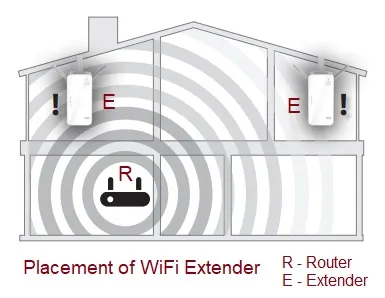
Figure 1: WiFi Extender Installation in a Home
The image above illustrates how a WiFi extender (“E”) can be strategically placed within line of sight (LOS) of the WiFi router (“R”) to eliminate dead zones.
Before purchasing a WiFi extender, consider these specifications:
- Wireless standards (802.11a/b/g/n/ac/ax)
- Frequency bands (2.4 GHz, 5 GHz, 6 GHz (in WiFi-6E))
- Data transfer rate (in Mbps)
- Ethernet port for wired connection
- WPS (WiFi Protected Setup)
- Power source (AC or USB)
- Weight, dimensions, and cost
WiFi Extender Installation Guide
Installing a WiFi extender is generally simple and can be done in a few ways:
- Mobile App: Use the dedicated mobile application for your WiFi extender brand (e.g., “Tether App” for TP-Link). Ensure the router and extender use the same password.
- Web Browser: Access the extender’s setup page through a web browser and follow the on-screen instructions provided in the datasheet or quick installation guide.
- WPS Button: If both your router and extender have WPS buttons, press the WPS button on the router first, followed by the WPS button on the extender.
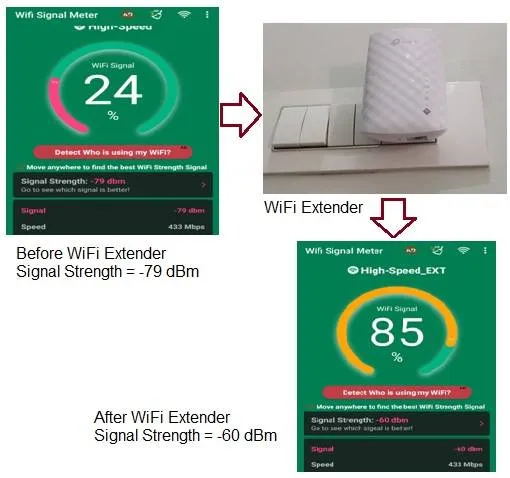
Figure 2: WiFi Extender Improving Signal Strength
The image above shows how a WiFi extender improved the signal strength from -79 dBm to -60 dBm.
Benefits or Advantages of WiFi Extenders
- Improved Performance: Extenders provide a more reliable and stronger WiFi signal in larger areas.
- Easy Setup: WPS and user-friendly apps make setup quick and simple.
- Extended Range: They effectively increase the coverage area of your WiFi network.
- Compatibility: WiFi extenders are generally compatible with most routers from brands like TP-Link, Netgear, Linksys, and D-Link.
- Flexible Connectivity: They can connect to the router wirelessly or via Ethernet cable.
- Uninterrupted Streaming: Eliminate buffering and enjoy seamless streaming in previously dead zones.
Drawbacks or Disadvantages of WiFi Extenders
- Cost: Some WiFi extenders can be expensive. Research and choose one that fits your needs and budget.
- Placement: Incorrect placement (not halfway between the router and dead zone) can cause interference with other devices.
Summary
Wi-Fi extenders provide an effective solution for expanding wireless coverage and improving connectivity in homes, offices, and large buildings.
Continue Learning Legacy Wi-Fi (IEEE 802.11b/a/g)
- WLAN Basics Tutorial
- WLAN Physical Layer: 802.11a PHY
- WLAN MAC Layer Part-1
- WLAN MAC Layer Part-2
- WLAN Security Basics, WEP Protocol and Wi-Fi Checklist
- WiFi Radio Frequency Channels: 2.4 GHz, 5 GHz, and 4.9 GHz
- WiFi Roaming: Understanding the Basics