
What is FTP : 5-10 Advantages and Disadvantages
Advertisement
File Transfer Protocol (FTP) is a standard network protocol used to transfer files between computers over TCP/IP networks. It is widely used for website management, backups, and file sharing. Advantages include simple file transfer and broad compatibility, while disadvantages include weak native security and vulnerability to unauthorized access if not properly protected.
Introduction : FTP allows users to upload, download, and share files in a structured, reliable manner. However, with the evolution of technology, newer protocols like SFTP, HTTP, and SCP have emerged with advanced security and efficiency features.
Key features & FTP Establishment Process
- This protocol is used to send/receive files from a remote computer (i.e., server).
- FTP establishes a connection between client and server before file transfer. Username and password are used for connection establishment.
- FTP protocol and its syntax are mentioned in RFC959, RFC765, and RFC1738.
- FTP handles both binary and text files.
- It uses TCP port numbers 20/21.
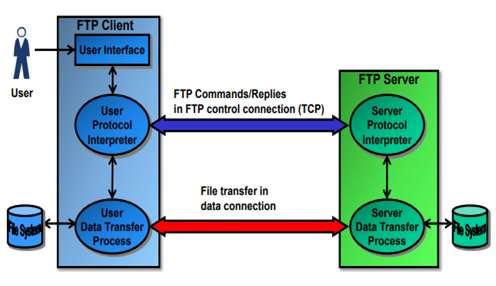
- When an FTP client requests to connect to the FTP server, a TCP connection is established to the FTP server’s port 21, which is reserved for FTP.
- The main function of FTP is to transfer files from a remote computer after a connection is established.
- FTP establishes two connections between the client system and the server system: one for control information and the other for the data being transferred.
- Control information carries commands/responses. After authentication is complete, files can be transferred between two systems.
Advantages of FTP
Following are some of the benefits of FTP.
- It is a connection-oriented protocol and uses robust control commands.
- It sends data over a separate TCP connection from the control commands. This enables fast data transfer.
- It is simple in implementation and use.
- It is a universal application due to its standardization. Hence, it is widely used.
- A company can set up an FTP server and store files and documents which can be accessed by employees using their login credentials. This avoids emailing each and every document and saves time and effort. Moreover, confidential documents are secured due to access within an intranet.
- Users of all operating systems (Linux, Windows, Mac) can connect with the server using FTP or Secure FTP protocol without any issues.
- If a file transfer is interrupted due to a network issue or other disruption, FTP allows for resuming the transfer without starting over, saving time and bandwidth.
- FTP is highly efficient for transferring large files or batches of files.
- With FTP, administrators can assign custom access permissions to files and directories, controlling who can upload, download, or modify content.
- FTP can be automated using scripts to schedule transfers or sync directories regularly.
Disadvantages of FTP
Following are some of the drawbacks of FTP.
- It requires more memory and programming effort.
- Clear text passwords and unencrypted data pose a security risk.
- Multiple TCP/IP connections are used, and firewalls can hinder the use of such connections.
- It is hard to filter active mode FTP traffic on the client side when a firewall is in place.
- It has high latency due to its connection-oriented nature.
- It does not support integrity checks on the receiver side.
- It does not support date/timestamp attribute transfer.
Summary
FTP enables efficient file transfer between networked systems. Advantages include ease of use and widespread support, while disadvantages include security limitations and the need for secure alternatives such as SFTP or FTPS.
FAQs on FTP: Questions and Answers for Interview
Question-1: What is FTP and how does it work?
Answer-1: FTP (File Transfer Protocol) is a standard network protocol used to transfer files between a client and a server over the internet or a local network. It operates on a client-server model, where users can upload or download files using FTP clients like FileZilla, Cyberduck, or even web browsers. FTP uses two channels: one for commands (control) and one for file data transfer.
Question-2: Is FTP secure for transferring files?
Answer-2: By default, FTP is not secure because it transmits data in plain text, including usernames, passwords, and file content. However, Secure FTP variants like SFTP (SSH File Transfer Protocol) or FTPS (FTP Secure, which uses SSL/TLS encryption) offer encryption and provide a safer way to transfer files over the internet.
Question-3: What are the advantages of using FTP over other file transfer methods?
Answer-3: FTP excels in handling large file transfers, allows bulk uploads/downloads, supports resuming interrupted transfers, and can be automated using scripts. It is also compatible with a wide range of platforms and offers custom permissions, making it suitable for complex file management tasks.
Question-4: What are the disadvantages of using FTP?
Answer-4: FTP lacks built-in encryption, posing security risks as data is transferred in plaintext, and its setup can be complex, especially for non-technical users, making it less suitable for secure or sensitive data transfers.
Question-5: What is the difference between FTP and SFTP?
Answer-5: FTP is a basic file transfer protocol that does not include encryption, making it insecure over public networks. SFTP (SSH File Transfer Protocol) is a secure version of FTP, which encrypts both the data and login credentials, ensuring safe transmission over the internet.
Question-6: Can I automate file transfers using FTP?
Answer-6: Yes, FTP can be automated using scripts or scheduled tasks. Many FTP clients allow users to set up automated file transfers, enabling regular synchronization of files between client and server without manual intervention. This is useful for routine file backups or batch transfers.
Advertisement

