
What is IP500 Wireless Network: Basics Explained
Advertisement
IP500 is a telecommunications platform commonly associated with enterprise voice and unified communication systems. It provides integrated support for voice, data, messaging and networking services, enabling organizations to deploy scalable communication infrastructure with advanced call management, collaboration and business connectivity features. The IP500 wireless network is also used for monitoring and sensing devices, as well as building automation.
- IP500 is a wireless IPv6-based mesh sensor network developed for low-power applications in commercial buildings.
- It promotes sustainability through the use of IPv6 standards.
- It’s a mesh network, ensuring lossless and redundant data connections.
- It provides full security through encrypted communication.
- IP500 products can be seamlessly integrated into existing building management systems.
- It can combine both wired and wireless networks to meet interoperability requirements.
- IP500 wireless networks can be easily set up and installed based on open standards.
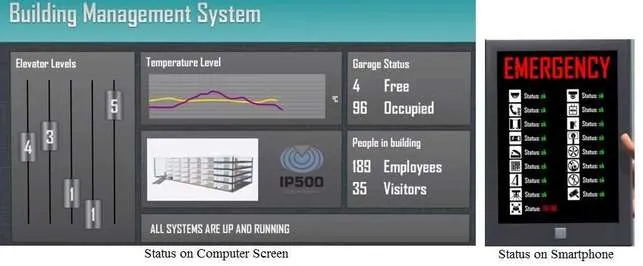
Figure 1: IP500 implementation as a building management system.
This IP500 system will have the following features:
-
It grants or denies access to individuals in the office.
-
It also informs them which room/floor they need to go to through a screen display.
-
IP500-based building management systems have features such as elevator levels, temperature levels, the number of people present in the building (including employees/visitors), garage status (free/occupied), and the number of systems that are up/down.
-
In addition, the system will have the following multiple emergency-related features/devices:
- Combustion detection
- Alarm (both audible/optical)
- Auto call to the fire brigade
- Auto elevator for people towards floors having open doors
- Opens emergency exits and closes fire doors
- Open turnstiles
- Display emergency information
- Open air ducts
- Actuate ventilation
- Switch off gas supply
- Switch off the main supply
- Light up escape route
- Engage extinguishing system
- Engage evacuation systems
- Check evacuation status
All the above alarms can be monitored using an easy to use application on a smartphone.
Innovative Wireless Applications & Use Cases
- Wireless Communication Basics : Key Advantages & Disadvantages
- Top 10 Applications of Wireless Technology
- Wireless Charging standards : Qi & NFC
- Wireless Electricity Transmission Basics
- Medical Telemetry & RF Wireless Technologies
- V2V vs V2I: Vehicular Wireless Communication
- Wireless Cloud Surveillance Systems
- Underwater Wireless Communication Systems
- Optical Wireless Network Communication
- Satellite & Mobile Communication : Key differences