
Python Tutorial: Introduction to Python, Statements, and the Interpreter (Part-1)
Advertisement
This Python programming tutorial covers what Python is, statements, and the interpreter.
What is Python?
Python is an interpreted, high-level programming language similar to Perl, Ruby, Tcl, and other scripting languages. It was created by Guido Van Rossum around 1990 and named in honor of Monty Python.
Common Applications and Non-Uses of Python
- Text processing/data processing
- Application scripting
- Systems administration/programming
- Internet programming
- Graphical user interfaces
- Testing
Python is not typically suited for:
- Device drivers and low-level systems
- Computer graphics, visualization, and games
- Numerical algorithms/scientific computing
However, Python is sometimes used in these application domains, but often only as a high-level control language. The computationally intensive parts are implemented in C, C++, Fortran, etc. For example, you wouldn’t typically implement matrix multiplication directly in Python.
Running Python
-
Python programs run inside an interpreter.
-
The interpreter is a console-based application that starts from a command shell (e.g., the Unix shell).
shell % python Python 2.5.1 (r251:54869, Apr 18 2007, 22:08:04) [GCC 4.0.1 (Apple Computer, Inc. build 5367)] on darwin Type "help", "copyright", "credits" or "license" -
Experienced programmers usually have no problem using the interpreter this way, but it may not be user-friendly for beginners.
-
Python includes a simple integrated development environment (IDE) called IDLE (another Monty Python reference).
The Python Interpreter
- When you start Python, you enter an “interactive” mode where you can experiment.
- If you type statements, they will run immediately.
- There is no edit/compile/run/debug cycle, and in fact, there is no “compiler” in the traditional sense.
Interactive Mode
The interpreter runs a “read-eval” loop:
>>> print "hello world"
hello world
>>> 37*42
1554
>>> for i in range(5):
...

     print i

...
0
1
2
3
4

> > >
Getting Help
Use the help(name) command. Type help() with no name for interactive help. Documentation is also available at https://docs.python.org.
Creating Python Programs
- Programs are stored in
.pyfiles. - Source files are simple text files.
- You can create them with your favorite editor (e.g., emacs).
- You can also edit programs with IDLE or other Python IDEs.
Python Statements
- A Python program is a sequence of statements.
- Each statement is typically terminated by a newline character.
- Statements are executed sequentially until the end of the file is reached.
- When there are no more statements, the program stops.
Comments
Comments are denoted by #.
# This is a comment
height = 442  # Meters - extends to the end of the line
There are no block comments in Python (e.g., /* ... */).
Variables
A variable is simply a name for a value. Variable names follow the same rules as in C. You do not declare types (int, float, etc.).
height = 442         # An integer
height = 442.0       # Floating point
height = "Really tall" # A string
This differs from C++/Java, where variables have a fixed type that must be declared.
Keywords
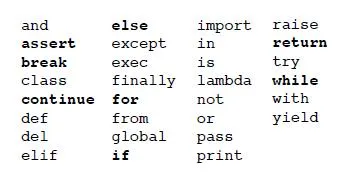
Variables cannot have one of these names. These are mostly C-like and have similar meanings.
Case Sensitivity
-
Python is case-sensitive.
-
These are all different variables:
name = "Jake" -
Language statements are always lowercase:
print "Hello World" # OK
# PRINT "Hello World" # ERROR - Removed due to error
while x < 0:       # OK
# WHILE x < 0:       # ERROR - Removed due to error
Loops
The while statement executes a loop:
while thickness <= height:
    thickness = thickness * 2
    numfolds = numfolds + 1
    print numfolds, thickness
Indentation
Indentation is used to denote blocks of code. It must be consistent. A colon (:) always indicates the start of a new block.
while thickness <= height:
    # Code inside the while loop
    pass
There is a preferred indentation style:
- Always use spaces.
- Use 4 spaces per level.
- Avoid tabs.
- Always use a Python-aware editor.
Conditionals
-
If-else:
if a < b: print "Computer says no" else: print "Computer says yes" -
If-elif-else:
if a == '+':
    op = PLUS
elif a == '-':
    op = MINUS
elif a == '*':
    op = TIMES
else:
    op = UNKNOWN
Relations
Relational operators: <, >, <=, >=, ==, !=
Boolean expressions: and, or, not
if b >= a and b <= c:
    print "b is between a and c"

if not (b < a or b > c):
    print "b is still between a and c"
Non-zero numbers and non-empty objects also evaluate as True:
x = 42
if x:  # x is non-zero
    # Code executed because x is True
    pass
The Print Statement
print x
print x, y, z
print "Your name is", name
print x,  # Omits newline, produces a single line of text
Continue Learning Python Programming Tutorial Series
- Python Programming : Part-2, dir, Data Types, Strings & Exceptions
- Python Programming : Part-3, Data Types and Structures: Tuples, Dictionaries & Containers
- Python Programming : Part-4, Sequences, zip Function & Sorting
- Python Programming : Part-5, List Processing, Comprehensions, Variables & Type Checking
- Python Programming : Part-6, Variables, Functions, Arguments & Exceptions