
What is Touch Screen Interface : Advantages and Disadvantages
Advertisement
A touch screen interface is a user input technology that enables direct interaction with electronic devices by detecting finger touches or stylus input on a display. Its advantages include intuitive operation, faster navigation, and space-saving design, while its disadvantages include fingerprint smudges, accidental touches, and reduced usability when wearing gloves or in harsh environments.
What is a Touch Screen Interface?
- A touch screen interface is a pointing technology based on the sense of touch, often referred to as haptics.
- It allows users to interact with a device by physically touching the screen to activate desired functions.
- There are different types of touch screen technologies available. Figure 1 shows a resistive touch screen.
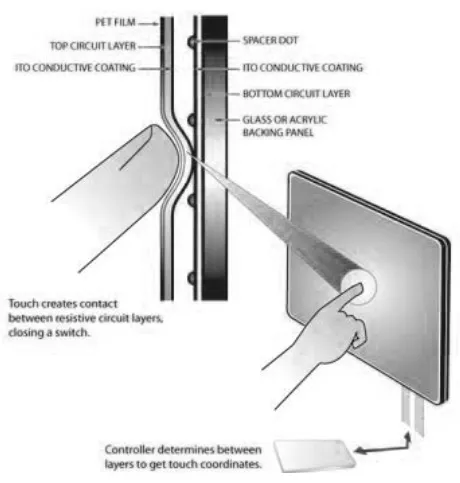
Image alt: touch screen
For more detailed information, you can refer to these resources: touch screen technology basics and selection guide and touch sensor basics.
Benefits or Advantages of Touch Screen Interfaces
- Easy to Learn and Use: Touch screens are intuitive, making them easy for even inexperienced users to learn and operate using just their fingers.
- Space Saving: By integrating the input device into the screen, touch screens eliminate the need for external devices like keyboards or mice, saving valuable space.
- Quick and Efficient Menu Selection: Touch screens provide a fast and direct way to select menu options.
- Easy Maintenance: The sealed surface of a touch screen prevents dirt accumulation, making it easy to clean and maintain.
- Flexible GUI: The graphical user interface (GUI) on a touch screen can be easily changed and updated through software upgrades.
- High Durability and Reliability: Touch screens are generally very durable and reliable, designed to withstand frequent use.
Drawbacks or Disadvantages of Touch Screen Interfaces
- Accuracy and Precision Limitations: Accuracy is dependent on the size of the icons or targets. Small icons can be difficult to accurately select, especially with larger fingers.
- Proximity Requirement: Users need to be within reach of the touch screen display to operate it, which can be a limitation in certain situations.
- Obscured Screen Information: Hands and fingers can sometimes block the screen while selecting options, making it difficult to see the content.
- Higher Power Consumption: Battery-operated touch screen devices often consume more power compared to devices with other input methods.
- Difficult for Visually Impaired Users: Touch screens are difficult for visually impaired people to use without tactile or braille input options.
- Sensitivity to Stray Touches: The sensitivity of touch screens means they can be accidentally activated by stray touches.
Summary
Touch screen interfaces have revolutionized user interaction across smartphones, tablets, kiosks, industrial equipment, automotive displays, and medical devices by combining input and display into a single platform. Their usability advantages improve efficiency, accessibility, and user experience, although durability, environmental conditions, and precision requirements should be considered when selecting the appropriate touch technology.