
What is GUI interface : 5 Advantages and Disadvantages
Advertisement
A Graphical User Interface (GUI) enables users to interact with computers and electronic devices through visual elements such as icons, menus, buttons, and windows. GUIs improve usability and accessibility for non-technical users. Advantages include ease of learning and productivity, while disadvantages include higher resource consumption and reduced flexibility for advanced operations.
Introduction : A GUI (Graphical User Interface) is a type of user interface that allows users to interact with a computer or software application through graphical elements such as icons, buttons, windows, and menus, as opposed to text-based interfaces like command-line interfaces (CLIs). GUIs are designed to make it easier for users to interact with computers and software by providing a visual representation of the system and its functions.
Key Features of GUI Interface
- Graphical Elements: GUIs use graphical elements such as icons, buttons, checkboxes, and sliders to represent actions or options. Users can interact with these elements using a mouse, touchpad, or touchscreen.
- Windows: GUIs typically use windows to separate different applications or tasks. Each window can contain its own set of graphical elements and content, making multitasking more manageable.
- Menus: GUIs often feature menus that provide access to various functions and options. These menus are usually organized hierarchically, allowing users to navigate through different levels of options.
- Point-and-Click Interaction: GUIs enable users to interact with the system by pointing and clicking with a mouse or tapping on a touchscreen. This makes it more intuitive and user-friendly, especially for people who may not be comfortable with text-based interfaces.
- Drag-and-Drop: Many GUIs support drag-and-drop functionality, allowing users to move files, icons, or other objects by clicking and dragging them to a new location.
- Visual Feedback: GUIs provide visual feedback to users, such as highlighting selected items, displaying tooltips, and showing changes in the interface when an action is performed. This feedback helps users understand the consequences of their actions.
- Icons: Icons are graphical representations of files, folders, applications, or functions. They make it easier for users to recognize and access items without having to read text labels.
- Graphics and Multimedia: GUIs can display images, videos, and other multimedia elements, making them suitable for applications like photo editing, video playback, and gaming.
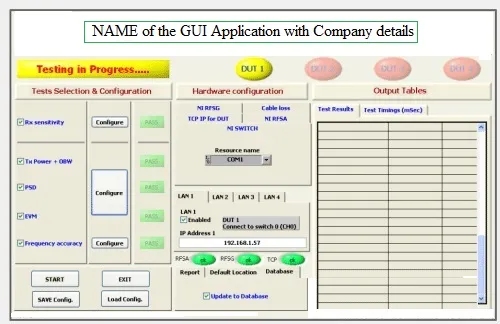
GUI is the interface where images are used to represent different choices. The choices are designed as per requirement of the end user applications.
Operating systems which support GUI interface include Windows, Linux, iOS, MacOS, Android etc. The programming languages which can be used in GUI based applications are VC++, C++, C#, PHP, Java script, Ruby, Objective-C, Python, Perl, .Net, HTML, Labview, MATLAB GUI etc. GUI language usually include elements such as windows, menus, icons, numeric/boolean controls & indicators, tabs, selection, graphs etc. The same has been depicted in one of the GUI interface developed using labview.
Advantages of GUI Interface
Following are some of the benefits of GUI Interface.
- It requires just a click on the simple picture or image in order to use its functionalities.
- It is very easy to use by novice users, as it is user friendly.
- A simple icon in a GUI interface uses multiple instructions in the back end. Hence it is easy for the programmer to code in GUI languages (such as VC++, VB, C#, .Net, Labview etc.) compared to other non GUI based programming languages.
- Programmers or users need not understand the inner workings of the computer system.
- It looks very attractive and multi-colored.
- It is much better than command driven interfaces which has many drawbacks.
- Users can switch quickly between tasks on the GUI interface.
- Full screen interaction is also possible with quick and wholesome access to anywhere on the screen.
Disadvantages of GUI Interface
Following are some of the drawbacks of GUI interface.
- It uses more computer memory as the aim is to make it user friendly and not resource optimized. As a result, it can be slow on older machines.
- GUI becomes more complex if the user needs to communicate with the computer directly.
- Certain tasks may take long due to many menus to select the desired choice.
- Hidden commands need to be searched using Help file.
- GUI based applications require more RAM in order to run.
- It uses more processing power compared to other interface types.
Conclusion
GUI interfaces simplify human computer interaction through graphical elements. Advantages include user friendly operation and faster learning, while disadvantages include increased system resource usage and limited control for expert users.